
You open LinkedIn and instead of your feed there's a flat notice saying your account is restricted. The first thought is usually the worst one: it's gone for good. In reality, "restricted" on LinkedIn covers something like a dozen different situations, and most of them are reversible — what matters is what you do in the first few hours and which moves make things worse rather than better.
What LinkedIn actually means by "restricted"
LinkedIn almost never uses the word "ban" — its own term is "restricted," and that single label covers a wide range of states: a one- or two-day pause on a single feature like sending invitations, a full login lock, a request to verify your identity, or a warning about automated activity. The wording in the notice varies — "your account has been temporarily restricted," "we've detected unusual activity," "we need to verify your identity" — but each one points to a different way back in.
A permanent closure is the rare exception, not the rule. It usually follows a pattern of repeated violations or one genuinely serious one, not a first slip.

Why accounts get restricted in the first place
Restrictions are almost always triggered by an algorithm, not a person who sat down and reviewed your specific profile. The system reacts to a handful of signal groups: third-party automation — extensions, bots, or scripts for bulk invites or scraping profile data are explicitly barred by the platform's user agreement; a sudden spike in invitations or messages in a short window, plus too many "I don't know this person" responses to your invites; a profile or content that doesn't look like a genuine identity — a made-up name, someone else's photo, inconsistent details; and finally, signs that someone other than you is in the account — a login from an unfamiliar device or country right after routine activity.
Because the call is made algorithmically, perfectly innocent users get caught in it too: a brand-new account, someone who just switched laptops, or a person who came back to LinkedIn after a long break and suddenly started being more active than usual.
The first hour: what to do before you make it worse
Until you know exactly which type of restriction you're dealing with, the priority is not making it worse. Turn off any third-party extension or service that was helping run the account — bulk invite senders, profile scrapers, auto-responders. If a tool like that triggered the restriction, it often lifts on its own within a few hours, a day at most, once the activity stops.
Don't open a second account "just in case." The user agreement is explicit: one person, one account, under a real name. If LinkedIn links a new profile to the old one, both can end up restricted.
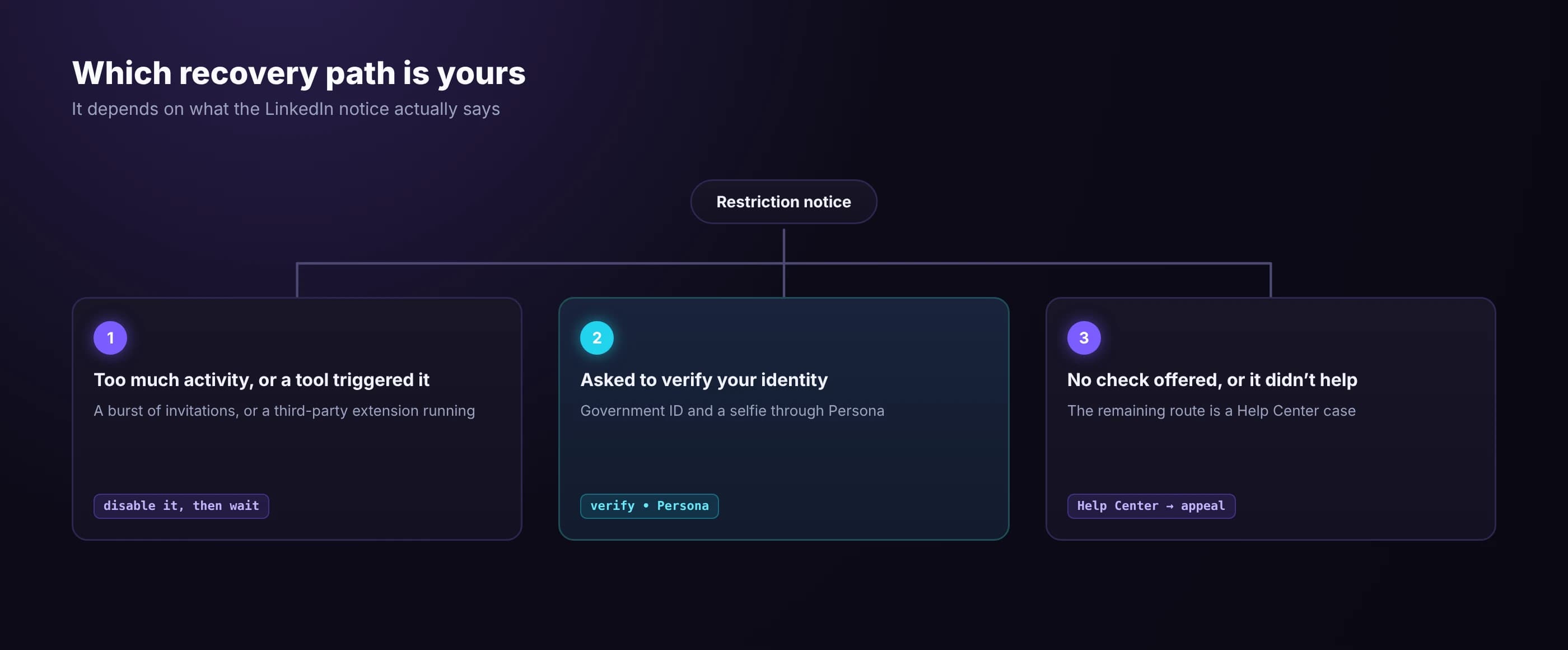
Read the notice carefully — it usually names the situation: a request to verify your identity, a temporary restriction, or an access-denied message with an appeal link. The exact wording decides which recovery path is yours.
If you're asked to verify your identity
LinkedIn's identity check runs through a third-party partner, Persona. On desktop you're typically asked to scan a QR code with your phone to continue the process there; inside the app it happens directly. From there it's a photo of a valid, unexpired government ID — a driver's license, passport, or state-issued ID; a student or library card won't work — followed by a selfie to match your face against the document. Persona processes that personal data under its own policies and only passes a result back to LinkedIn once it's done.
If the documents are clear and current, access usually comes back within a few business days. A blurry photo, a cropped edge, or an expired document is close to a guaranteed second round. People in Canada, the EU, or the UK have an alternative when standard verification doesn't work for them: a notarized Affidavit of Identity attached to a support case.
If there's no verification option, or access still hasn't returned: filing an appeal
When the notice doesn't offer a verification step, or a completed identity check didn't lift the restriction, the remaining route is LinkedIn's Help Center — Contact Us — which leads to the form for restricted accounts (often linked directly from the restriction banner itself).
Write the appeal calmly and factually: the account email, roughly when the restriction started, and what you think likely triggered it — if you were genuinely sending an unusual volume of invitations or running a browser extension, say so plainly and note that you've already stopped. Close with a request for a manual review.
Submit it once. Parallel tickets and repeated follow-ups asking the same thing don't speed anything up; they tend to clutter the queue instead. Permanent restrictions and anything tied to multiple accounts belonging to one person are the hardest to reverse, and here honesty beats a tidier-sounding story — inconsistencies in the explanation read as a reason to say no on their own.
How long this usually takes
Activity-based restrictions often clear on their own within a few hours to about a day once the triggering behavior stops. Identity verification with clean documents tends to wrap up within a handful of business days; it stretches out if your photos get rejected or a human reviewer has to step in. An appeal over something serious can take noticeably longer — a week or more isn't unusual, and there's no guaranteed outcome either way.
After you're back in: staying out of the same spot
The first temptation after reinstatement is to make up for lost time and jump straight back to your previous pace of invites and messages. Resist it: an account that just had a restriction lifted stays under closer scrutiny for a while, and a sudden jump in activity reads as a second warning sign rather than business as usual.
Turn on two-factor authentication — accounts with it enabled are noticeably more likely to be routed to a verification step the next time something looks off, rather than hit with an outright block. Make sure the name on your profile matches your ID; a mismatch is exactly the kind of thing that triggers identity-related restrictions. And drop any third-party extension that automates connecting or scraping profiles — it's named directly as prohibited software in the user agreement, and detection for it keeps getting better.
The same algorithmic logic shows up on other platforms too: anyone running a business through social media tends to collect their own stories about getting locked out — a piece on surviving a Google Play ban walks through a similar appeal mechanism on a different platform, and one on the wave of Instagram unfollows and bans shows that automated enforcement is a pattern across social networks, not something unique to LinkedIn.
Telling a real notice apart from phishing
A genuine verification prompt shows up inside LinkedIn's own app or site, right when you try to do something — not as an email attachment asking you to download a "fix," and not on some outside page asking for your password. LinkedIn states plainly that it will never ask for your password by email or ask you to download anything to lift a restriction. If a message does either of those things, it's fake, no matter how official the formatting looks.
In the end, what moves an appeal forward isn't polished wording — it's specificity: a concrete date, an honestly stated reason, and confirmation that the triggering behavior has actually stopped. What happens after that comes down to the account's activity, not the letter that got it reviewed.
